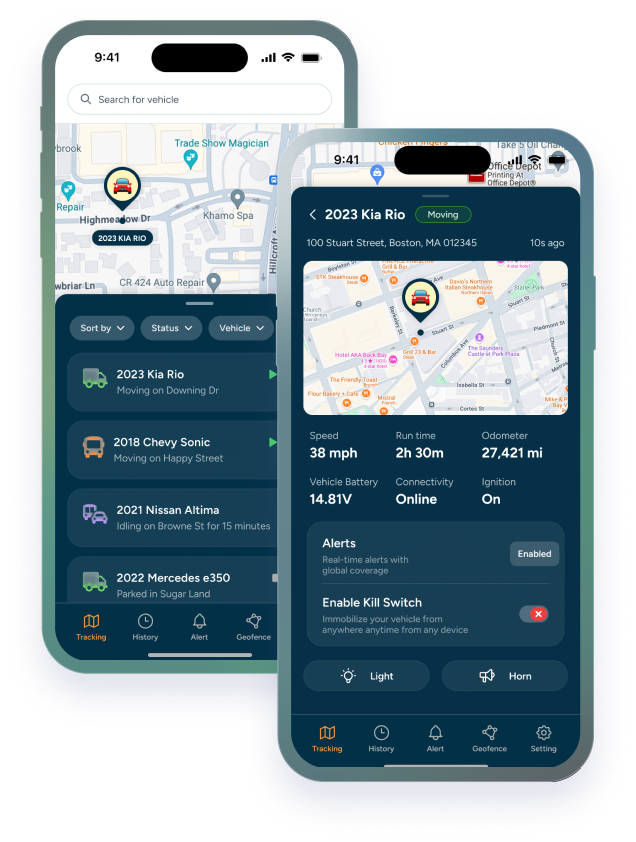

Most businesses spend a lot of time comparing GPS tracker specs and not nearly enough time evaluating the company behind the device. Hardware is largely commoditized at this point — the meaningful differences between GPS tracking providers come down to how well the platform fits your specific operation, how easy it is to set up and maintain, and what kind of support you get when something isn't working.
Before you sign anything or hand over a credit card, run through these six questions. The answers will tell you more about a GPS tracking provider than any feature comparison chart.
What Assets Are You Tracking?
This sounds like a question you ask yourself, not the provider — but it belongs in your conversation with them because the answer should shape their recommendation. A provider worth working with will ask about your asset mix before pushing a product. One that leads with a single hardware option regardless of what you're running is selling, not solving.
If you operate trucks and vans alongside trailers and equipment, you need a platform that handles both motorized and non-motorized assets. A vehicle tracking device hardwired into a truck and a battery-powered trailer GPS tracker have completely different power, reporting, and installation requirements. Some platforms handle this mix well. Others are built for one or the other and will give you a patchwork solution.
What to ask: "Do you support both hardwired vehicle trackers and battery-powered asset trackers on the same platform and dashboard?"
|
TRACKHAWK GPS TIP If you run trailers or standalone equipment alongside your vehicles, confirm you can see all asset types on a single map view — not two separate logins or platforms cobbled together. |
How Often Do You Need Location Updates?
Update frequency is one of the most misunderstood specs in GPS tracking — and providers don't always make the distinction clear. There are two meaningful categories:
Real-time tracking: location updates every second or every few seconds. This is what you need for active fleet monitoring systems — drivers on routes, vehicles in motion, dispatch decisions being made in the moment. If you're watching a live map to manage where your team is, this is the standard you need.
Live tracking: updates every minute, every 5 minutes, every 10 minutes, or even longer (based on how you choose it to be). Useful for assets that move infrequently — trailers between jobs, equipment on a job site, vehicles that check in periodically. Lower data usage, longer battery life on portable units, and more than enough resolution for most non-vehicle assets.
The mistake most buyers make is assuming "real-time" means the same thing across all providers. Ask specifically: how many seconds between updates on your active vehicle plan? Some platforms that advertise real-time tracking are actually updating every 60 seconds — which is live tracking, not real-time.
|
“ |
The right update frequency depends on the asset. Push for real-time on vehicles with drivers. Live updates are often perfectly sufficient — and more battery-efficient — for trailers and equipment at rest. |
What Theft Prevention Features Matter Most?
GPS tracking and theft prevention overlap, but they're not the same thing. A basic GPS tracker tells you where your asset is. A theft prevention setup tells you the moment something moves unexpectedly — and gives you the history to support recovery and insurance claims after the fact.
Geofence alerts: instant notifications when an asset leaves a designated area. The key word is instant — a geofence alert that takes 10 minutes to fire is nearly useless for theft response. Ask how fast alerts trigger after a boundary is crossed.
Motion detection: accelerometer-based alerts that trigger when a stationary asset starts moving. Critical for trailers and equipment that shouldn't be touched after hours. This is separate from GPS location — it fires before the asset has even left the yard.
Route history: a complete log of everywhere an asset has been. In a theft event, this is what law enforcement needs. Ask how far back the provider stores route history. Thirty days is the industry minimum. Trackhawk stores a full year — which matters when a theft investigation takes months or an insurance dispute requires historical data.
Hidden installation options: a tracker that can be found and removed in 30 seconds isn't a deterrent. Ask whether the hardware supports concealed mounting and whether the provider has guidance on placement for theft resistance.
Can the System Scale With Your Business?
The fleet tracking system that works for 3 vehicles needs to still work — and still make sense financially — when you have 50 then 100. Scalability is about two things: technical capability and pricing structure.
On the technical side, ask whether the platform can handle mixed asset types, multiple users with different permission levels, and reporting across a larger asset pool without becoming unwieldy. A dashboard that works beautifully for 5 assets can become genuinely hard to manage at 50 without proper filtering, grouping, and reporting tools.
On the pricing side, understand exactly how costs scale. Per-asset pricing means your monthly bill grows linearly with your fleet — which is predictable, but can become expensive quickly during a growth phase. Some providers offer volume tiers or flat-rate plans that make more sense at scale.
What to ask: "If I add 10 more vehicles next year, what does my monthly cost look like, and does anything change about the platform or support level?"
|
TRACKHAWK GPS TIP Watch out for providers who quote you a per-device hardware cost plus a per-device monthly fee plus a platform fee. The total cost of ownership across a growing fleet adds up fast and is sometimes buried in the fine print. |
Is Installation Simple and Flexible?
Installation complexity is one of the most underestimated friction points in GPS tracking adoption. A system that requires a certified installer for every device, or that only supports one mounting method, creates ongoing operational overhead that adds up every time you add an asset or replace a unit.
Hardwired installation: wired directly into the vehicle's electrical system. More permanent, no battery concerns, supports real-time reporting. Requires some technical comfort or a professional installer — typically 30–60 minutes per vehicle.
OBD-II plug-in: plugs directly into the vehicle's diagnostic port. No wiring, no tools, takes about 60 seconds. Easy to move between vehicles. A strong option for smaller fleets or for businesses that rotate assets frequently.
Battery-powered and magnetic mount: the most flexible option for gps tracker for company vehicles, trailers, and equipment. Installs in minutes, no wiring, fully portable. Requires a battery management strategy — replacement or recharging on a schedule based on reporting frequency.
The best providers support all three methods and will help you match the right install type to each asset class. Be cautious of providers who push a single installation approach across all asset types — it usually means the hardware lineup isn't flexible enough to handle a real mixed fleet.
What Happens After the Sale?
This is the question most buyers forget to ask — and the one that determines whether GPS tracking actually delivers value or becomes an expensive piece of hardware gathering dust because nobody knows how to use it properly.
Post-sale support covers several things: onboarding and setup assistance, ongoing technical support when something isn't working, platform training so your team actually uses the features available, and account management as your needs change.
What to look for: a real support team reachable by phone or chat, not just a ticket queue with a 48-hour response window. Onboarding that goes beyond a link to a YouTube tutorial. And a provider who checks in after installation to make sure the system is working the way you expected.
The difference between a GPS provider and a GPS partner comes down to what happens 90 days after you sign up. Ask for specifics: Who is your point of contact after purchase? What does onboarding look like? What's the typical response time for a support issue?
|
“ |
A great GPS tracking system that nobody on your team knows how to use is just an expensive box. Post-sale support isn't a nice-to-have — it's what determines whether the investment actually pays off. |
Your Pre-Purchase Checklist
Before you commit to any GPS tracking provider, make sure you have clear answers to all six:
|
Question |
What to Listen For |
|
What assets are you tracking? |
Do they support both motorized and non-motorized assets on one platform? |
|
How often do you need updates? |
Can they configure real-time (seconds) vs. live (minutes) per asset? |
|
What theft prevention matters most? |
Do they offer instant geofence alerts, motion detection, and route history? |
|
Can the system scale? |
Is pricing per-asset or flat? What happens when you add 10 more vehicles? |
|
Is installation simple? |
Do they support hardwired, OBD, and battery-powered options? |
|
What happens after the sale? |
Is there a real support team or just a ticket queue? |
A provider who can answer all six confidently; and specifically, not with marketing language — is one worth serious consideration. One who deflects, overpromises, or can't give you straight answers on support and pricing is telling you something important before you've signed anything.
The right provider doesn't just sell you a tracker. They help you actually use it.