
GPS tracker installation is not just a device task. For a business fleet, it is a rollout decision that affects vehicles, drivers, managers, alerts, support, and how the team uses tracking data after the devices go live.
Without a plan, installation can create confusion. Vehicles may be missed, device types may not match asset needs, alerts may not be ready, and managers may not know who is responsible for reviewing the system.
GPS tracker installation for business fleets works best when the business defines the rollout goal, asset list, installation type, timing, responsibilities, and software workflow before devices are installed.
This article is for business owners, fleet managers, operations teams, and implementation leads preparing to install GPS trackers across vehicles, trailers, equipment, or mixed assets.
TL;DR / Key Takeaways
- GPS tracker installation should start with a clear business goal, not just a device order.
- A fleet rollout plan should include asset inventory, device type, timing, access, roles, alerts, and support needs.
- Plug-in, battery-powered, hardwired, and kill switch devices may require different installation planning.
- The first week after rollout should be used to review alerts, permissions, and whether the system supports the actual workflow.
Start With the Fleet Rollout Goal
Before installing trackers, define what the business needs GPS tracking to solve. Theft prevention, real-time visibility, driver behavior, maintenance reminders, route history, and asset control all require slightly different setup choices.
Installation works better when the goal is clear before the device is touched.
For teams planning a broader rollout, Trackhawk’s business GPS tracking plans can help connect the installation decision to fleet size, device needs, and ongoing software access.
Build an Asset List Before Installation Starts
A clean rollout starts with a simple list: every vehicle, trailer, machine, or asset that needs tracking; where it is located; who can access it; and what type of device it needs.
This step helps prevent missed vehicles, duplicate installs, and confusion between powered and non-powered assets. It also helps the business prioritize high-value vehicles, hard-to-replace equipment, and assets that create the most risk when they are unavailable.
For fleets installing trackers because unauthorized use is a concern, Trackhawk’s article on Business Vehicle Security can help connect installation planning to policies, alerts, and response workflows.
Match Installation Type to Device Type
Not every GPS tracker is installed the same way. Plug-in devices may work for vehicles with accessible OBD-II ports. Battery-powered trackers may be better for trailers or non-powered assets. Hardwired devices may fit vehicles where a more permanent setup is needed.
If the rollout includes immobilization, the planning needs to be more careful. A GPS kill switch or starter interrupt feature should be installed and used only in approved situations, with clear permissions, policies, disclosures, and applicable rules reviewed before rollout.
For hands-on installation context, Trackhawk’s guide on How to Install a Kill Switch on a Car can help buyers understand why hardwired and control-based devices need more planning than simple plug-in trackers.
Plan Timing, Access, and Responsibilities
The easiest installation plan is the one that fits the business schedule. Vehicles may need to be available in waves, drivers may need notice, and managers may need to coordinate keys, parking, device assignments, and install windows.
This is also where roles matter. Someone should own the install list, someone should confirm completed devices, and someone should verify that each tracker appears correctly in the platform.
Businesses that need help finding installation support can use Trackhawk’s Installer Locator to connect installation planning with practical next steps.
Set Alerts and Roles Before the Devices Go Live
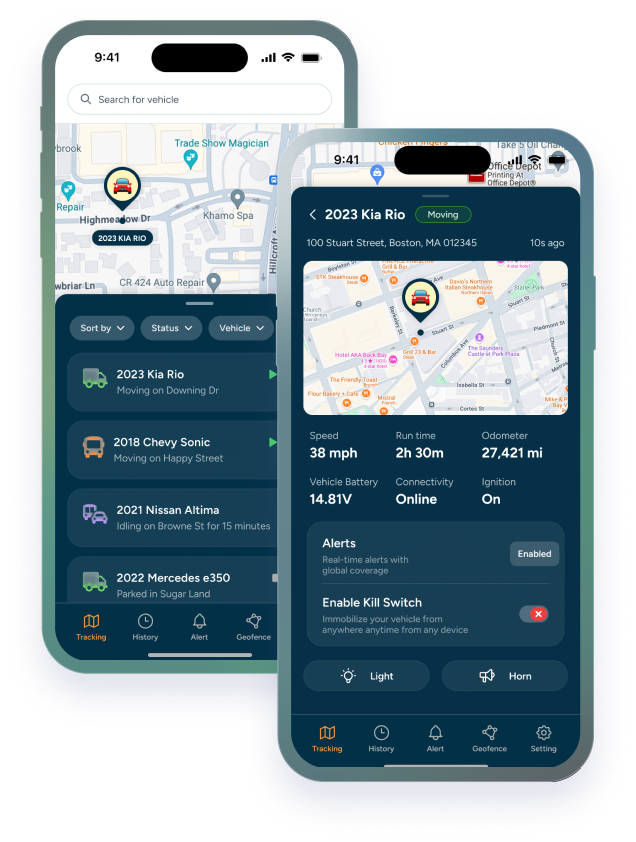
A tracker is only useful if the software workflow is ready. Before launch, the business should decide who receives alerts, who can view vehicles, who can change settings, and which alerts matter on day one.
Start with the highest-value alerts: geofence exits, after-hours movement, towing, maintenance reminders, driver behavior, or battery-related alerts depending on the fleet. Too many alerts at launch can make the system feel noisy before the team learns how to use it.
The smart move is to set up simple rules first, then adjust once managers see how the fleet behaves in real use. If device removal or unplugging is a concern, Trackhawk’s article on What Happens When You Unplug a Car Tracker? explains why setup and alerts matter.
Review the Rollout After the First Week of Use
The first week is not just a test of the devices. It is a test of the rollout plan. Managers should confirm that trackers are reporting, alerts are useful, users have the right permissions, and the system supports the workflows it was meant to improve.
If something feels confusing, adjust early. That may mean changing alert thresholds, cleaning up vehicle names, adding users, revising geofences, or updating the internal process for reviewing data.
Trackhawk can help business fleets plan installation around the assets, roles, and tracking goals that matter most.
A good rollout does not end when the tracker is installed. It ends when the team knows how to use the system with confidence.
Frequently Asked Questions
What should businesses plan before GPS tracker installation?
Businesses should define the rollout goal, build an asset list, choose device types, plan timing and access, assign responsibilities, and configure alerts before devices go live.
Are all GPS trackers installed the same way?
No. Plug-in, battery-powered, hardwired, and kill switch devices may have different installation requirements depending on the vehicle, asset type, and desired control features.
When should a business use professional installation?
Professional installation may be useful for hardwired trackers, larger fleet rollouts, or devices with control features such as starter interrupt or kill switch functionality.
What alerts should be set before launch?
Businesses should start with the alerts that match their goals, such as geofence exits, after-hours movement, towing, driver behavior, maintenance reminders, or battery-related alerts.
How soon should a fleet review its rollout?
A first-week review is useful for checking device reporting, alert quality, user permissions, naming, geofences, and whether the system supports the actual workflow.
What happens if a GPS tracker is unplugged?
Depending on the device and setup, unplugging may affect reporting or trigger an alert. Businesses should review device type, alert settings, and internal response steps before rollout.