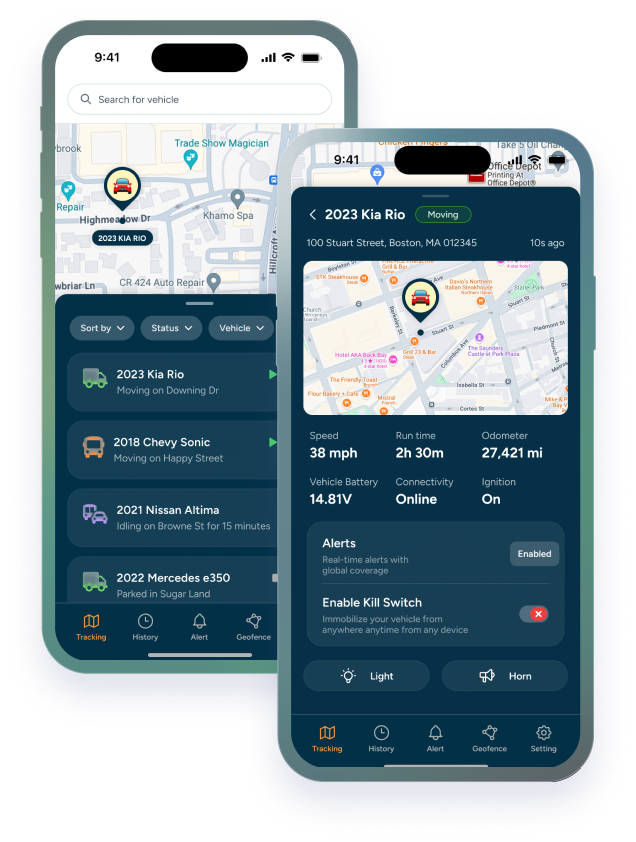

Choosing the right fleet GPS tracking system can feel overwhelming. There are plug-in trackers, hardwired devices, mobile apps, dashboards, driver behavior tools, route optimization features, maintenance alerts, dash cams, and reporting options. The best choice depends on your business, your vehicles, your team, and the problems you are trying to solve.
A fleet GPS tracking system should do more than show dots on a map. It should help your team make faster decisions, reduce wasted time, protect vehicles, and improve accountability. Whether you manage service trucks, delivery vans, rental vehicles, motorpool vehicles, or mixed commercial assets, the right system can help you stay in control.
Trackhawk’s GPS Fleet Tracking Software is designed for businesses that need real-time tracking, alerts, geofencing, driver behavior visibility, maintenance support, and easy access from web and mobile tools.
Understand Your Team’s Tracking Needs and Goals
The best fleet GPS tracking system is the one that matches your actual business needs. Before comparing providers, define what the system needs to accomplish.
Ask:
- Do you need live location tracking?
- Do you need driver behavior alerts?
- Are fuel costs a major problem?
- Do vehicles leave approved service areas?
- Do you need maintenance reminders?
- Are you managing drivers, vehicles, assets, or all three?
- Do you need mobile access?
- Do you need hardwired devices or plug-in trackers?
- Will multiple managers need access?
- Are theft, misuse, or recovery major concerns?
Your answers determine which features matter most.
Identify Key Features Required for Fleet Management
A strong system should include the features that support your team’s daily workflow.
Real-Time Location Tracking
Real-time tracking lets managers see where vehicles are right now. This helps with dispatch, route review, job verification, late arrivals, and recovery.
Route History
Route history helps managers review where vehicles went, when they stopped, and how long trips took. This supports billing, customer disputes, coaching, and operations.
Geofencing
Geofencing lets you create digital boundaries around job sites, warehouses, yards, service areas, customer locations, or restricted zones. When a vehicle enters or leaves, the system can send an alert.
Driver Behavior Monitoring
Driver behavior tools can identify speeding, harsh braking, harsh acceleration, excessive idling, and other behaviors that affect safety and operating cost.
Maintenance Alerts
Maintenance reminders help prevent avoidable downtime. Look for service alerts based on mileage, time, engine hours, or diagnostic signals.
Mobile App Access
Fleet managers need access outside the office. A mobile app helps managers check alerts, search vehicles, and respond quickly.
Reporting
Reports should be clear and usable. Look for summaries around mileage, idling, driver behavior, utilization, geofence events, maintenance, and device health.
Assess Budget and ROI
Fleet tracking costs include hardware, software subscription, installation, support, and possible integrations. A cheaper system may be fine for basic visibility, but it may not solve deeper operational problems.
Think about the cost of:
- Lost vehicles
- Fuel waste
- Unplanned downtime
- Manual dispatching
- Missed service windows
- Unsafe driving
- Underused vehicles
- Customer delays
- Theft or misuse
A fleet GPS tracking system should help reduce those costs or make them easier to manage.
Analyze Fleet Size and Vehicle Types
The right system depends on fleet makeup. A small service fleet may need simple tracking and maintenance alerts. A large mixed fleet may need dashboards, user permissions, reports, geofencing, and different device types.
Vehicle types can include:
- Service trucks
- Delivery vans
- Passenger vehicles
- Heavy trucks
- Rental cars
- Motorpool vehicles
- Trailers
- Equipment
- Non-powered assets
A good tracking partner should help match hardware to each vehicle type.
Compare Device Types
OBD-II GPS Trackers
OBD-II trackers plug into the diagnostic port. They are easy to install and can work well for quick deployment, smaller fleets, or vehicles where a plug-in setup is acceptable.
Hardwired GPS Trackers
Hardwired trackers connect directly into the vehicle. They are usually better for long-term fleet use, higher-risk vehicles, and situations where tamper resistance matters.
Battery-Powered Trackers
Battery-powered trackers work well for trailers, equipment, and non-powered assets. Battery life and reporting frequency are key considerations.
Rugged or Waterproof Trackers
Outdoor assets, trailers, and equipment may need weather-resistant hardware. For harsh environments, rugged devices are often worth the investment.
Trackhawk’s Hardware Products page can help businesses compare device options by vehicle and asset type.
Explore Essential Fleet GPS Features
Real-Time Location Functionality
Live location is one of the most valuable features because it supports immediate decisions. If a customer calls asking where a technician is, your team can answer. If a vehicle leaves a service area, your team can respond.
Route Optimization Support
A tracking system should help identify inefficient routes, repeated delays, unnecessary mileage, and idling patterns. Even if the software does not plan every route automatically, the data should help managers improve dispatch decisions.
Maintenance Alerts
Maintenance alerts help reduce downtime by turning service into a planned event instead of an emergency. Tracking mileage and usage helps managers schedule inspections and repairs more accurately.
Driver Behavior Tracking
Driver behavior data should be used to improve safety and reduce risk. It can help identify coaching opportunities and reward safer driving.
Device Health Monitoring
A tracker that stops reporting should be visible immediately. Device health alerts help managers catch installation, power, or tampering problems early.
Compare Fleet GPS Providers
When comparing providers, look beyond the feature list.
Consider:
- Ease of use
- Device reliability
- Mobile app quality
- Customer support
- Installation support
- Pricing transparency
- Warranty or hardware support
- Reporting quality
- Scalability
- User permissions
- Integration options
A system that looks powerful but is difficult for your team to use may not deliver value.
Review Installation and Ease of Use
Installation affects long-term reliability. DIY installation may be fine for plug-in devices, but professional installation is often better for hardwired trackers, kill switch devices, and larger rollouts.
Professional installation can help with:
- Correct wiring
- Better device placement
- Reduced tampering risk
- Cleaner setup
- Faster activation
- Fewer device issues
Ease of use matters just as much. A dashboard should be simple enough for managers to use every day.
Consider Mobile Integration and Software Compatibility
Fleet teams need access from the office and the field. Mobile integration allows managers to view vehicle locations, receive alerts, and respond quickly.
If your business already uses fleet management software, dispatch software, maintenance systems, or a CRM, ask whether the GPS platform supports exports, APIs, or integrations.
Trackhawk’s Integrations and API page is useful for businesses evaluating data connectivity.
Analyze Customer Support and Maintenance
Support matters when your business depends on the system. Before choosing a provider, ask:
- What support hours are available?
- Is live support included?
- Is installation support available?
- How are hardware issues handled?
- Is there a warranty?
- Can the provider help with device replacement?
- How quickly can they help when vehicles stop reporting?
Trackhawk’s Why Trackhawk page explains support, warranty, and customer-first service positioning.
Security and Compliance Considerations
Fleet tracking touches driver privacy, business policies, data access, and vehicle security. Companies should use tracking for legitimate business reasons and disclose it where required.
Review:
- Employee tracking notice requirements
- Driver policy language
- Vehicle ownership and authorization
- Data retention
- User permissions
- GPS access rules
- State-specific requirements
- Customer or contractor disclosure where relevant
This is not legal advice. Businesses should review tracking policies with counsel when needed.
How Trackhawk Supports Fleet GPS Tracking
Trackhawk GPS provides smart tracking for businesses that need visibility, alerts, and operational control. A Trackhawk system can support:
- Real-time GPS tracking
- Geofencing
- Driver behavior alerts
- Route history
- Maintenance alerts
- Web and mobile app access
- Hardware plus software included
- Smart Kill Switch technology where appropriate
- Transparent business pricing
For businesses comparing plans, visit Business GPS Tracking Plans.
Final Checklist Before Choosing a Fleet GPS Tracking System
Before selecting a system, confirm:
- It fits your fleet size.
- It supports your vehicle types.
- It has the right device options.
- It provides real-time tracking.
- It includes geofencing.
- It offers useful reports.
- It supports mobile access.
- It includes maintenance alerts.
- It has reliable customer support.
- It can scale as your fleet grows.
- It supports your privacy and compliance needs.
Questions to Ask Vendors Before You Buy
Before choosing a fleet GPS tracking system, ask direct questions. The answers will show whether the provider is a good fit.
- What device types are available?
- Can the system support both vehicles and assets?
- Is installation included or separate?
- Does the platform support geofencing?
- Can alerts be customized by user or department?
- Are maintenance alerts included?
- Is driver behavior tracking included?
- Can managers access the system from a mobile app?
- What support is available after installation?
- How does pricing change as the fleet grows?
- Is there a warranty or hardware replacement policy?
- Can data be exported for reporting?
These questions keep the buying process focused on actual fleet needs instead of a long feature list.
Common Buying Mistakes
Many businesses choose a fleet tracking system too quickly. Avoid these mistakes:
- Buying based only on monthly price
- Choosing a device that does not match the vehicle type
- Ignoring installation quality
- Forgetting about mobile access
- Setting up too many alerts
- Not training managers or drivers
- Failing to review privacy and notice policies
- Choosing software that is too difficult to use
- Not confirming support availability
- Skipping device health monitoring
A system should make fleet management easier. If it creates more manual work, the setup needs to be adjusted.
How to Know the System Is Working
After implementation, the best sign of success is not that the map looks good. The system is working when managers make faster decisions and fewer issues slip through unnoticed.
Watch for improvements such as:
- Fewer calls asking where vehicles are
- Faster dispatch decisions
- More accurate customer ETAs
- Better maintenance follow-through
- Less idle time
- Fewer unauthorized trips
- Faster response to theft or misuse
- Better driver coaching conversations
If the system does not change decisions, it needs better setup, better training, or better reporting.
A good buying decision should be based on fit, not the longest feature list. If the system helps your team see vehicles faster, respond to issues sooner, and keep maintenance on schedule, it is doing its job.
For Trackhawk buyers, that means looking for a system that combines hardware, software, support, and business pricing in a way that can grow with the fleet.
Closing Thoughts
A fleet GPS tracking system should make your operation easier to manage, not harder. The right platform gives your team visibility, alerts, reports, and the confidence to make decisions faster.
When evaluating options, focus on the system that matches your real goals: reducing downtime, improving safety, protecting vehicles, cutting waste, and improving customer service.
Trackhawk GPS helps businesses build smarter fleets with real-time tracking, alerts, software access, and support that keeps the system useful after installation. The right platform should keep improving as your fleet, routes, and team grow.