
Why the best-run service businesses don't choose between planning tools and visibility tools ; they use both
If you run a field service company and you're evaluating tools to get more control over your operations, you've probably landed on two categories: dispatch software and GPS tracking.
Maybe you already have one. Maybe you're trying to decide which one to invest in. Maybe someone told you they do the same thing and you only need one.
They don't do the same thing. They solve different problems, cover different blind spots, and when used together, they create a level of operational control that neither one delivers alone.
Here's exactly what each tool does, where each one falls short on its own, and why the field service companies with the tightest operations use both.
What Dispatch Software Does Well
Service dispatch software is a planning and coordination tool. It's built to answer the question: *what needs to happen, and who's doing it?*
Done well, it's genuinely powerful. The best dispatch scheduling software handles:
|
▸ |
Job creation and assignment: turning a customer call into a scheduled job with the right tech assigned. |
|
▸ |
Calendar and schedule management: visualizing who's booked, when, and for how long across the whole team. |
|
▸ |
Customer communication: automated confirmations, reminders, and notifications so customers know when to expect someone. |
|
▸ |
Invoicing and job history: keeping records of what was done, what was charged, and what's outstanding. |
|
▸ |
Tech mobile access: giving techs job details, customer notes, and checklists on their phones. |
For a growing field service company, dispatch management software is often the first real operational upgrade; and rightly so. It replaces whiteboards, sticky notes, and spreadsheets with a system that scales.
But there's a fundamental limitation built into every dispatch software platform, and it becomes more costly the more your company grows.
Where Dispatch Software Falls Short
Dispatch software is brilliant at managing what's *planned.* It has almost no visibility into what's *actually happening.*
Once a tech leaves the shop and heads to a job, your dispatch system essentially goes dark. You assigned the job. The tech accepted it. What happens between that moment and the invoice close is largely invisible.
|
▸ |
Did the tech take the most efficient route? Dispatch software doesn't know. |
|
▸ |
Did he arrive on time, or 45 minutes late? Dispatch software doesn't know. |
|
▸ |
How long was he actually on-site? Dispatch software shows what he logged; not what GPS tracking would verify. |
|
▸ |
Did he make any unscheduled stops between jobs? Dispatch software doesn't know. |
|
▸ |
Is the truck moving right now, or has it been idling for 30 minutes? Dispatch software doesn't know. |
|
▸ |
Was the vehicle used after hours? Dispatch software doesn't know. |
|
THE PLANNING VS. REALITY GAP Dispatch software manages the plan. GPS tracking monitors the reality. In a perfect world, they'd always match. In field service, they almost never do; and the gap between them is where your margin disappears. |
The "Blind Spot" Problem in Field Service Operations
Every field service company operating without GPS tracking has a blind spot. It starts the moment a tech pulls out of the driveway and ends when they pull back in; or log a job complete on their phone. Everything in between is based on trust, self-reporting, and the occasional check-in call.
That blind spot is expensive in ways that are hard to see because the costs are distributed and invisible:
|
▸ |
A tech who idles for 25 minutes between jobs every day costs you roughly 2 hours of fuel and productivity per week. Per tech. |
|
▸ |
A job logged as 3 hours that was actually 2.5 hours; with 30 minutes unaccounted for; happens more than any owner wants to know. |
|
▸ |
An after-hours vehicle use incident that results in a claim lands in your lap with no documentation to defend yourself. |
|
▸ |
A customer dispute about whether a tech showed up is unresolvable without location data, and unresolved disputes cost you both money and reputation. |
None of these are catastrophic individually. But a field service company running 6–10 techs, 250 days a year, is absorbing these costs constantly; in fuel, payroll, liability, and lost customer confidence.
Employee GPS tracking closes the blind spot. It doesn't replace your dispatch system. It picks up exactly where your dispatch system stops.
How GPS Tracking Complements Dispatch Systems
The smartest way to think about service dispatch software and GPS tracking is as two layers of the same operational stack; not competitors for the same budget.
|
LAYER 3: REAL-WORLD VERIFICATION GPS confirms what actually happened: arrival times, locations, routes, duration |
|
LAYER 2: REAL-TIME VISIBILITY GPS shows where every tech is right now and responds to what's actually happening in the field |
|
LAYER 1: PLANNING & SCHEDULING Dispatch software manages jobs, assignments, schedules, and customer communication |
Your dispatch scheduling software builds the plan. GPS tracking monitors execution of that plan in real time; and creates a verified record of what actually happened.
When both are running together, the loop is complete:
|
▸ |
Dispatch assigns the job. GPS confirms the tech is en route. |
|
▸ |
Dispatch sends the customer an ETA. GPS makes that ETA accurate because you can see where the tech actually is. |
|
▸ |
Dispatch logs the job complete. GPS verifies arrival time, time on-site, and departure; independent of what was manually entered. |
|
▸ |
Dispatch generates the invoice. GPS data provides a clean paper trail if the customer disputes anything. |
|
DISPATCH SOFTWARE ALONE You know what was planned. You have no independent verification of what actually happened in the field. |
DISPATCH + GPS TRACKING You know what was planned and what actually happened. Every gap between the two becomes visible and fixable. |
Why Visibility Is the Missing Layer in Most Service Businesses
Most field service companies invest in dispatch management software early; it's the obvious first step when you're trying to get organized. GPS tracking comes later, if at all, often because it feels like a surveillance tool rather than an operational one.
That perception is the single biggest reason average service companies stay average.
Employee vehicle tracking and employee GPS tracking aren't about watching your people. They're about closing the information gap between what you planned and what's actually happening so you can run a tighter operation, respond faster, and make better decisions.
|
Feature |
Dispatch Software |
GPS Tracking |
Both Together |
|
Job scheduling & assignment |
Yes |
No |
Yes |
|
Customer notifications & ETAs |
Yes |
Partial |
Yes (accurate) |
|
Real-time tech location |
No |
Yes |
Yes |
|
Route history & proof of visit |
No |
Yes |
Yes |
|
Idle time & fuel monitoring |
No |
Yes |
Yes |
|
After-hours vehicle alerts |
No |
Yes |
Yes |
|
Overtime verification |
No |
Yes |
Yes |
|
Payroll & time accuracy |
Partial |
Yes |
Yes |
|
Blind spot coverage |
No |
Yes |
Yes |
The companies that figure this out; that visibility is the missing layer, not an optional add-on; consistently outperform competitors on the metrics that matter: jobs per tech per day, customer satisfaction scores, overtime costs, and fuel spend.
The ones that don't figure it out keep wondering why their margins are thinner than they should be, why certain techs always seem to take longer than others, and why customer disputes are so hard to resolve cleanly.
How Trackhawk GPS Bridges the Gap Between Planning and Reality
Trackhawk GPS is built specifically for field service companies that are ready to close the visibility gap without replacing the dispatch tools they already use.
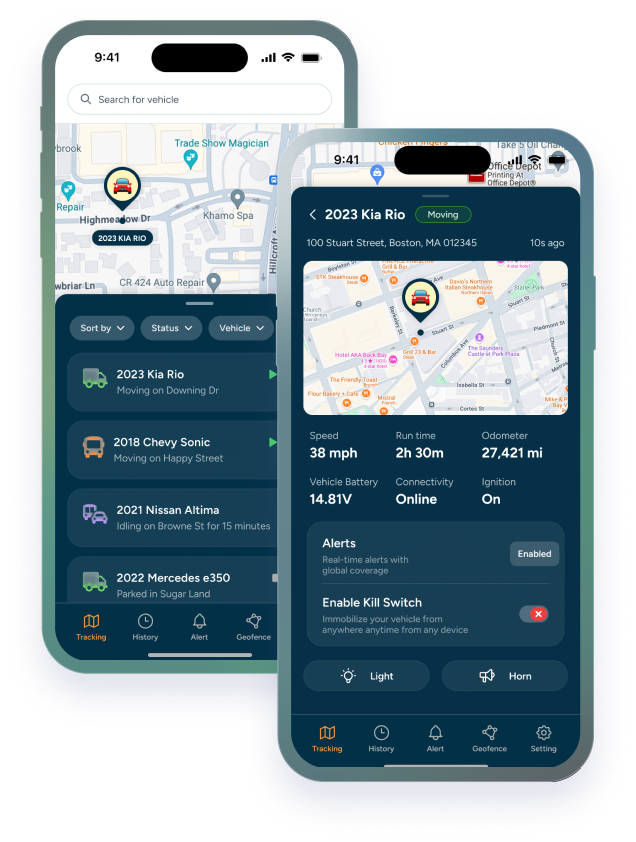
Rather than forcing a choice between planning and visibility, Trackhawk GPS adds the real-time location layer that sits on top of your existing service dispatch software, whether that's Jobber, ServiceTitan, Housecall Pro, or any other platform.
|
▸ |
Real-time fleet map: see every vehicle, every tech, every status at a glance. No phone calls. No guessing. |
|
▸ |
Route history and job verification: pull timestamped arrival, duration, and departure data for any job, any day. |
|
▸ |
Idle time and fuel reporting: know exactly where your fuel budget is going and which behaviors to address. |
|
▸ |
After-hours alerts: instant notification if any vehicle moves outside authorized hours. |
|
▸ |
Overtime verification: location-confirmed clock records that tie payroll to actual on-site time. |
|
▸ |
Dispatch integration: feed real-time location data into your existing workflow so dispatch decisions are based on where techs actually are, not where they were last logged. |
|
THE TRACKHAWK GPS DIFFERENCE Most GPS tools track location. Trackhawk GPS gives field service companies the operational visibility layer their dispatch software was never built to provide, turning real-time data into faster dispatch, cleaner payroll, and a defensible record of every job, every day. |
The field service companies with the tightest margins and the fastest growth aren't choosing between dispatch software and GPS tracking. They're running both; because planning without visibility is just guessing with a better calendar. And visibility without planning is chaos with a map. You need both layers. Trackhawk GPS is the one you're missing.