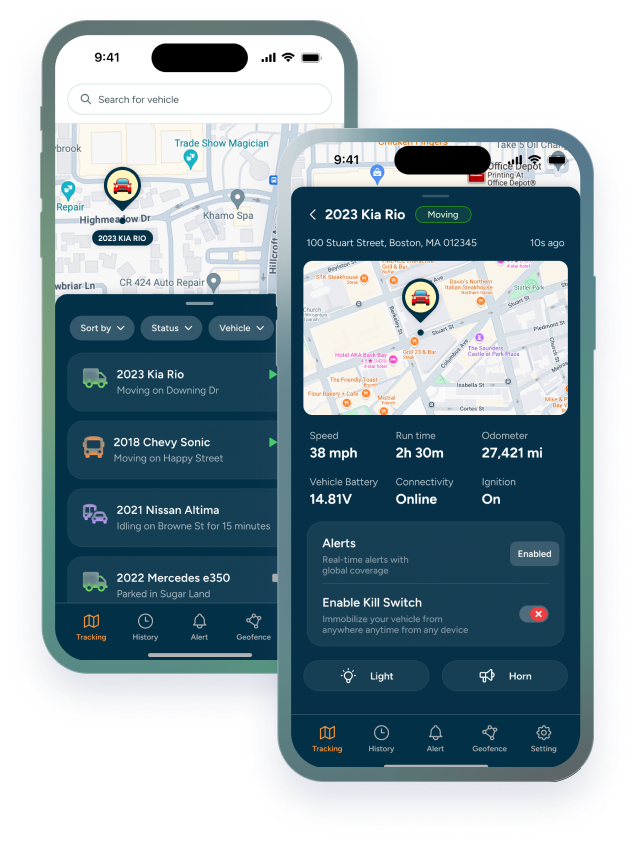

Yes. Geofencing can track heavy equipment movement on construction sites by pairing a GPS tracker on the machine with a virtual boundary around the site. When the machine crosses that boundary, you get an alert, and how quickly depends on how often the device reports.
Construction sites are open, busy, and hard to supervise around the clock. Equipment moves between sites, crews change, and machines sit unattended overnight and over weekends.
Geofencing gives you a way to say where equipment is supposed to be and get told when it isn't. Paired with GPS tracking for heavy equipment, it's one of the simplest ways to keep control of a job site without adding staff.
This guide covers how geofencing works, how to set it up around your sites, how it helps with theft prevention, after-hours activity, and safety, and what to look for in a solution.
What Geofencing Is and How It Works
A geofence is a virtual boundary drawn around a real-world location, like a job site, a yard, or a customer's property. A GPS tracker on the machine reports its location, and the platform compares that location to the boundary. When the machine crosses it, you get an alert.
|
Draw a boundary around the site |
→ |
Tracker reports its location |
→ |
Machine crosses the boundary |
→ |
Alert to you |
That's the whole idea, and it's why construction equipment GPS tracking and geofencing work so well together. The tracker supplies the location. The geofence supplies the meaning: this machine is where it should be, or it isn't.
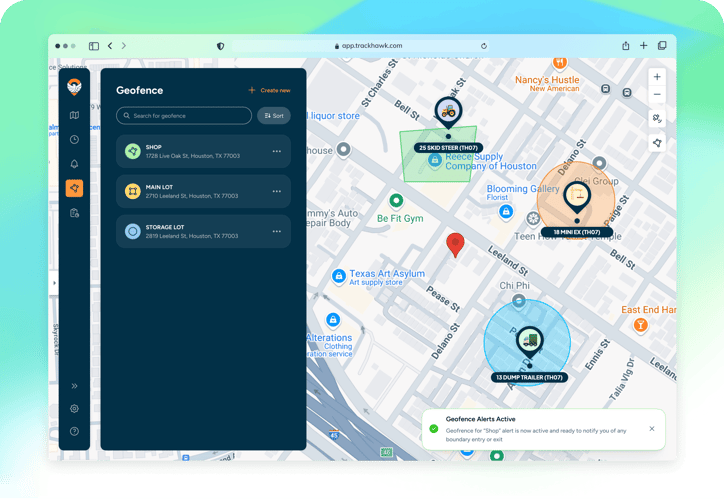
One thing to understand early: an alert fires when the platform sees a location that's crossed the boundary, so how quickly you hear about it depends on how often the device reports. We cover that at the end.
Creating Virtual Boundaries Around Job Sites
A geofence is only as useful as the boundary you give it. A few habits make them work better:
-
Cover the whole site, with a margin. GPS isn't exact. A boundary drawn too tightly can trigger false alerts when a machine is parked near the edge.
-
Use one geofence per site. Give your yard, each job site, and each customer location its own boundary, so an alert tells you exactly which one was crossed.
-
Name them clearly. "Main Street Site" is more useful at 2 a.m. than "Geofence 4."
-
Update them as work changes. Sites grow, shrink, and finish. Retire boundaries you no longer need and redraw the ones that moved.
-
Group equipment by site. Organizing machines by job site, customer, or region makes alerts easier to read. You can set up groups yourself, without waiting on a support ticket.
A site's boundary is also a good place to start thinking about which machines belong there. If a machine is assigned to one site and shows up at another, you'll know. You can always learn more about creating geofences in the Trackhawk GPS app by watching our software demo!
Alerts for Unauthorized Movement and Entry/Exit
Once a boundary is in place, a few kinds of alerts do the work:
|
Alert |
Fires when |
Useful for |
|---|---|---|
|
Exit |
Equipment leaves a geofence |
Theft, or a machine moved to another site without notice |
|
Entry |
Equipment enters a geofence |
Confirming arrival at a site, or spotting a machine in a place it shouldn't be |
|
Movement |
A machine that should be parked starts to move |
After-hours moves and unexpected relocations |
|
Device Power Disconnected |
A tracker loses external power |
A tracker being unplugged or having its power cut |
|
Tamper |
Another signal about the device itself |
Interference with the tracker |
Not every alert is a problem. A crew may be moving a machine to the next site, and a driver may take a different route. The alert tells you it happened so you can check, and a quick call usually settles it.
Preventing Theft Before It Happens
A geofence doesn't physically stop anyone from taking a machine. What it does is shorten the time between a machine leaving and you knowing about it, and that time is when a theft is easiest to respond to.
|
HOW GEOFENCING FITS INTO A THEFT PREVENTION PLAN • A geofence around the site or yard sends an alert the moment a machine leaves • Movement alerts catch a machine that starts to move when it shouldn't • Device Power Disconnected alerts flag a tracker that's been unplugged, and every device gets them by default • A kill switch on the VL03 and TH75 lets you disable equipment remotely |
Kill switch devices can be set up so the kill switch triggers from an alert or a boundary. Think carefully about how you use that with heavy machinery, since cutting a machine that's already running can create its own risks
Monitoring After-Hours Activity Automatically
Nobody wants to watch a map all night. The point of automatic monitoring is that the system watches for you and you only hear about the things that matter.
For after-hours activity, that usually means a geofence around the site, plus a movement alert on machines that should be parked. If a machine starts to move at 2 a.m., or crosses the boundary in the middle of the night, you find out when it happens and not the next morning.
Idle Time Exceeded alerts add another layer. They flag a machine that's been idling past a threshold you set, anywhere from 2 to 60 minutes, which can point to a machine running when it shouldn't be.
As with every alert, a call is the right next step, not a conclusion. A machine moving at night may have a legitimate reason.
How Does Geofencing Improve Worker Safety in Construction Projects?
Geofencing can support safety by helping you control where equipment is and isn't, but it isn't a safety system on its own.
-
Keeping equipment where it's authorized. Machines that turn up at the wrong site, or in a zone they shouldn't be, are a risk you'd rather catch early.
-
Flagging unexpected use. A machine moving or running outside normal hours means someone is operating it when no one expects them to.
-
Supporting vehicle safety. On devices that report them, driver behavior alerts like harsh braking and acceleration help you spot unsafe driving in support vehicles.
There are limits to be honest about. GPS isn't precise enough for collision avoidance or close-range proximity warnings. And geofencing on equipment trackers shows where machines are, not where individual workers are. For worker-level safety, you need purpose-built safety systems, and geofencing works best alongside them, not in place of them.
Benefits of Implementing Geofencing for Construction Fleet Management
Geofencing earns its place by saving time and giving you earlier warning. The benefits that matter most for a construction fleet:
-
Fewer check-in calls. You can see when a machine arrives at or leaves a site, so you don't have to ask.
-
Earlier warning on unauthorized movement. An exit alert tells you a machine has left an approved site when it happens, not the next morning.
-
A faster response to theft. If a machine is gone, you know when it left and which way it went, so you start with something concrete.
-
Better use of equipment. Seeing which machines are on which site makes it easier to spot equipment sitting at a finished site, or needed somewhere else.
-
A record of where equipment has been. Entry and exit history shows when a machine arrived and left, which can support rental disputes, billing questions, and insurance claims.
-
Less admin as sites change. Once geofences and groups are set up, alerts run in the background, and you only update them when a site changes.
There's a catch. Geofences need some tuning. Boundaries that are too tight, or alerts sent to too many people, create noise, and noise gets ignored. Start with a few well-placed geofences and adjust from there.
What Are the Top Geofencing Platforms for Small Businesses?
Most GPS fleet and asset tracking platforms include geofencing, so the better question is which one fits a small operation. For a smaller construction business, a few things usually matter most:
-
Easy setup. You should be able to draw a geofence and start getting alerts without a long onboarding.
-
Devices that fit your equipment. A platform that only supports road vehicles won't help with trailers and attachments.
-
Clear subscription terms. Ask about contract length and what happens when you add or remove devices.
-
A usable mobile app. Small teams are often in the field, not at a desk.
-
Real support. When an alert doesn't behave the way you expect, you want to reach a person.
Providers worth evaluating include:
-
Hapn: An equipment-first platform for construction and rental fleets, according to its website.
-
Samsara: A broad fleet management platform with vehicle tracking, cameras, and asset monitoring.
-
Verizon Connect: GPS fleet management and tracking for businesses managing vehicles and related assets.
-
Geotab: Vehicle telematics and data integrations, especially relevant to fleets with substantial road-vehicle operations.
-
Trackhawk GPS: GPS tracking for businesses that need visibility across mixed fleets (powered equipment, trailers, rental assets..) especially beneficial for mid-size fleets that don't need to pay corporate subscription price. Trackhawk GPS is mostly known for its Kill switch technology adding another layer of security that allows you to control your equipment remotely to support your peace of mind
These aren't direct substitutes. Before choosing, confirm that the provider's current hardware supports your equipment and that geofencing is included in the plan you're considering.
Best Geofencing Solutions for Construction Site Security
There isn't one best setup, because sites aren't alike. A fenced yard, a busy job site, and a remote lot each call for something different. Here's how we'd set up geofencing for four common situations.
A fixed yard or storage lot
Draw one geofence around the yard and set exit alerts, so you know when a machine leaves. Add movement alerts on machines that should stay parked overnight. The right GPS tracking device for construction equipment depends on how each machine is powered: hardwired trackers suit powered machines, and battery-powered trackers suit trailers and small equipment.
An active job site with several machines
Use one geofence per site, and organize machines into a group for each. Entry alerts confirm that equipment arrived where it was supposed to, and exit alerts flag anything that leaves without notice. Idle Time Exceeded alerts can show machines running when no one is using them.
A remote or unattended site
Battery-powered trackers work best where there's no power to tap into and nobody around to check. The TH07 is built for that, with up to 8+ years of battery life with limited movement. Battery devices report less often, so alerts arrive more slowly than on a hardwired device. Check network coverage at the site first, since the TH07 roams on AT&T and T-Mobile only.
Rental equipment at customer sites
Set a geofence around each customer's approved site, and update it when the machine moves to the next customer. Exit and movement alerts tell you when a machine isn't where the rental agreement says it should be.
In every case, geofencing works best alongside physical security, not instead of it. Fencing, lighting, locks, and cameras make theft harder, and geofences and alerts tell you quickly when something happens anyway.
How Trackhawk Combines Geofencing with Real-Time Tracking
At Trackhawk GPS, geofencing and tracking live in the same platform. You see machines on the map, review where they've been, and get geofence alerts for the sites you've set up, with maintenance status, default device alerts, and group management alongside. That's GPS for construction equipment as one system, not a set of separate tools.
How "real-time" it feels depends on the device. Alerts follow each device's reporting schedule, so a machine that reports more often gets you an alert faster:
|
Device |
Reports when moving |
Reports when stationary |
|---|---|---|
|
VL03 (hardwired) |
Every 30 sec |
Every 10 min |
|
TH75 (hardwired) |
Every 30 sec |
Every 20 min |
|
VL04 (OBD) |
Every 10 sec |
Every 1 min |
|
TH07 (battery) |
A position fix every 2 to 3 min, uploaded every 15 min |
Every 12 hrs (recovery mode: every 30 sec) |
|
TH-MAG (battery) |
Every 10 min |
Every 24 hrs |
Hardwired devices give you the closest view. Battery-powered devices trade update frequency for battery life, so they suit trailers and equipment that mostly sit. Choose the device for each machine based on how closely you need to watch it.
How to set up geofencing zones to control access on construction sites? (using the trackhawk app)
Setting up a geofence in Trackhawk takes a few minutes. The video below walks through the entire software demo on screen, if you skip to min 6:01 you can see the exact steps that summarize the process of creating geofences in the Trackhawk Fleet app.
1. Open the geofence tools in the Trackhawk web platform.
2. Create a new geofence. Give it a clear name, like "Main Street Site," and set its location and size. Leave a margin around the site so a machine parked near the edge doesn't trigger a false alert.
3. Choose what triggers the alert: a machine entering the boundary, leaving it, or both.
4. Choose which equipment it applies to. If you've organized machines into groups by job site, you can apply the geofence to the whole group.
5. Choose who gets notified.
6. Save it and check that it works. Alerts show up in the Alerts Log, so you can confirm the geofence is behaving the way you expect.
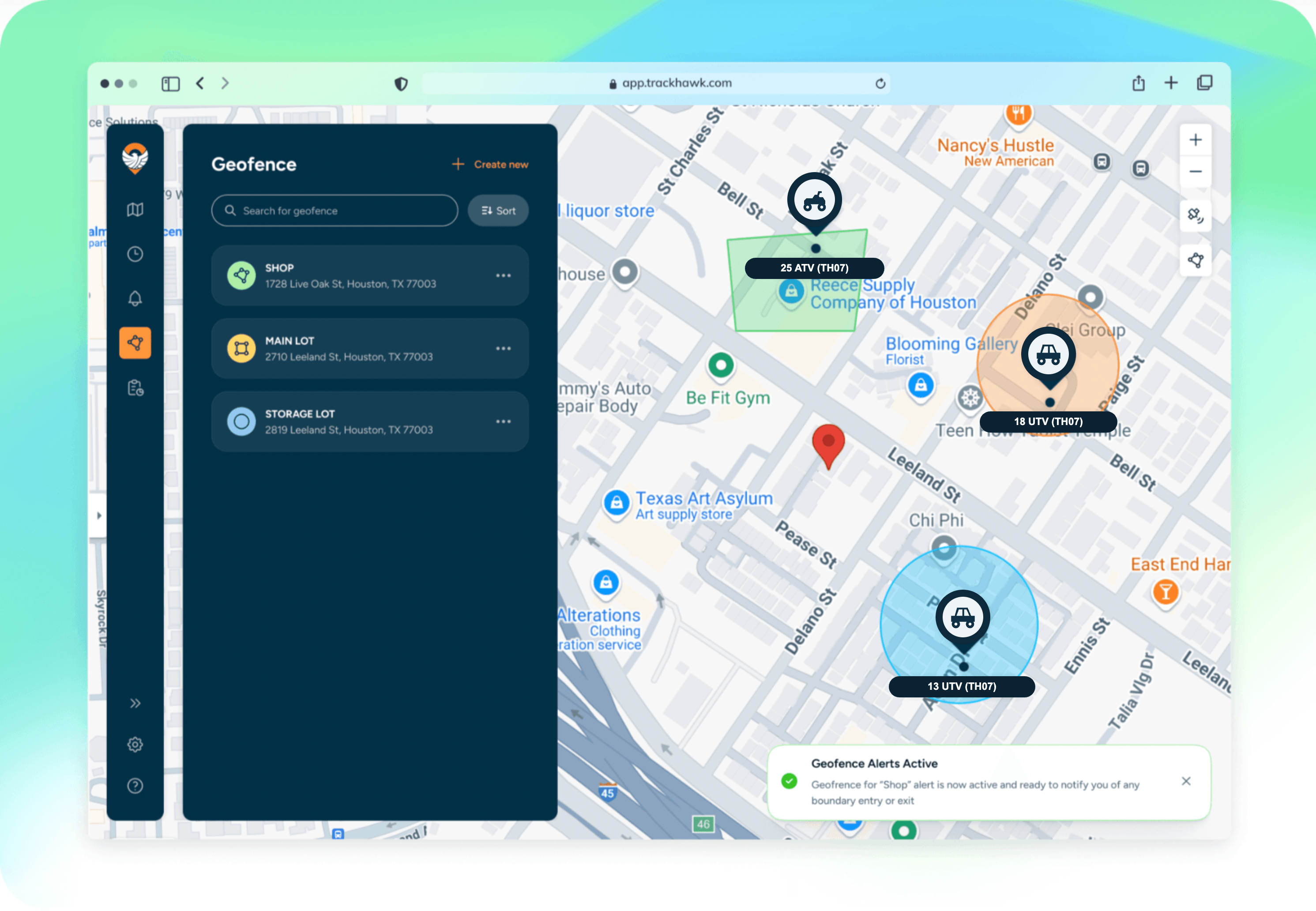
Two habits keep geofences useful over time. Update a geofence when a site changes, and retire the ones you no longer need so old alerts don't add noise.
See how it fits your sites. Talk to our team about the equipment you track and how you'd set up geofences for your job sites. Book a free demo.