
Fleet Maintenance Tracking Software Triggered by GPS Mileage and Engine Hours

Skip a service interval and you trade a small, planned cost for a breakdown. Trackhawk’s Maintenance Module uses live GPS mileage, engine hours, and calendar time to keep preventative service on schedule — then logs the work so every asset has a clean history.

Trackhawk is GPS fleet maintenance tracking software for fleets that already need location, not a shop CMMS. If you want preventative service triggered by real mileage and engine hours — without standing up a separate fleet maintenance software stack for work orders and parts — this module is the workflow.
Why GPS fleet maintenance tracking cuts repair cost

The math is simple

Running an asset to failure costs up to 10 times more than keeping it on a schedule. Preventative maintenance tracking is not an extra expense line. It is how you stop paying for emergency labor, idle assets, and early replacements.
10x
Return on every dollar spent on preventative maintenance

Through avoided repairs, avoided labor, and assets that stay in service instead of sitting on a lift.

3–5x
Lower maintenance spend

 Emergency repairs run three to five times what the same work costs when it's planned. 

3–5x
Lower maintenance spend

 Emergency repairs run three to five times what the same work costs when it's planned. 

25–30%
Less unplanned downtime

 Fewer surprise outages means fewer days an asset can't earn. 

25–30%
Less unplanned downtime

 Fewer surprise outages means fewer days an asset can't earn. 

25–30%
Less unplanned downtime

 Fewer surprise outages means fewer days an asset can't earn. 

The 10x is made of this

What you actually pay for when maintenance slips

None of these show up on a maintenance budget. They all show up on the bottom line.

Emergency repairs & after-hours labor
Entire system breakdown instead of one part
Early asset replacement
Higher fuel & energy bills
Lost business while the asset sits idle
Health & safety hazards
Voided warranties
Features

Fleet maintenance tracking that runs off the GPS you already use

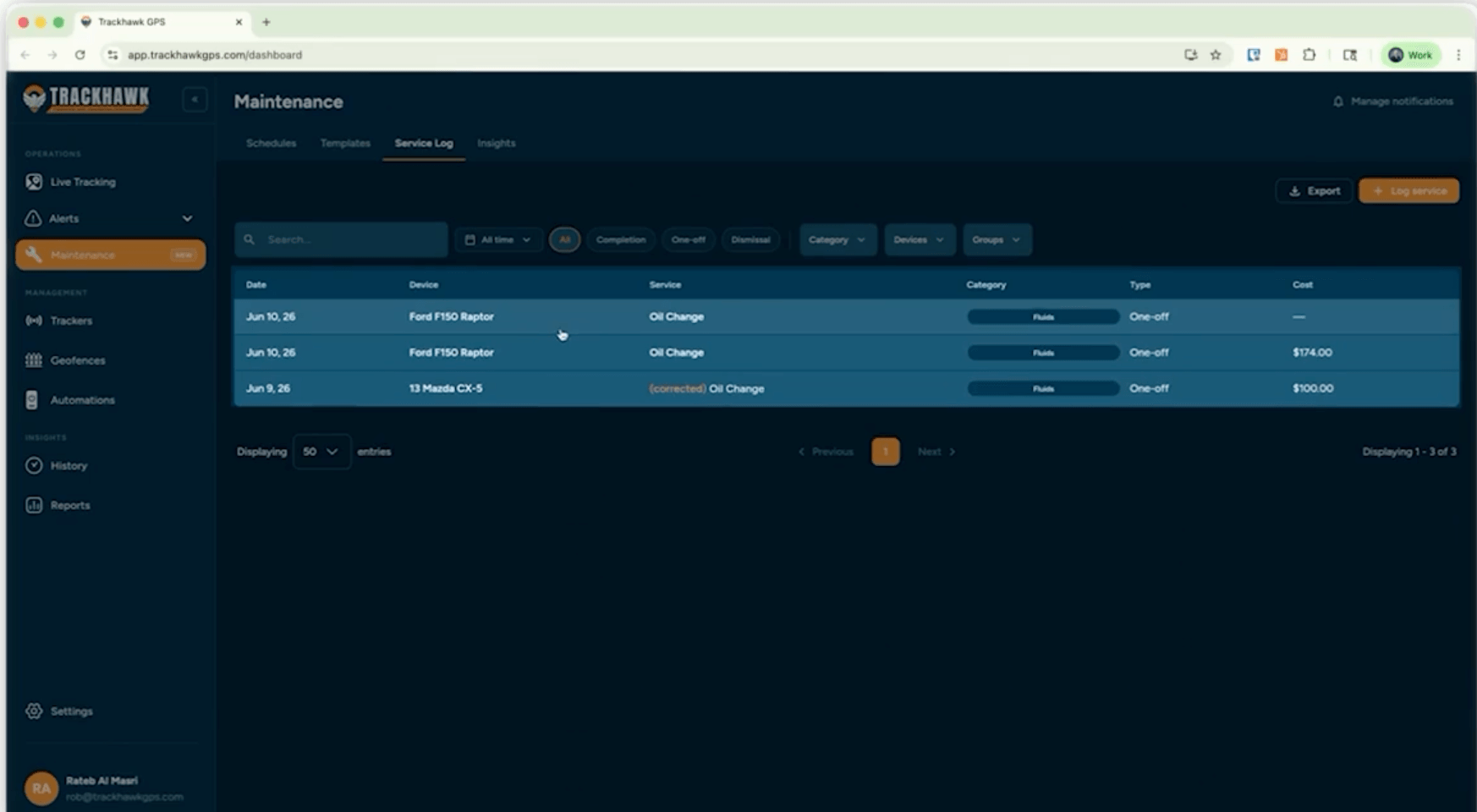
Schedules fire from GPS mileage, engine hours, or time — whichever comes first. Trackhawk flags due-soon and overdue vehicles, records skipped service, and stores a service history you can audit. That is fleet maintenance tracking inside the same platform that already tracks the vehicle.

Maintenance cost insights per vehicle

Total clarity on what each vehicle's upkeep is actually costing you.

Due, due-soon, and overdue schedules in one list

See exactly what's due at a glance and act on it.

Due-soon and overdue flags in the dashboard

Due-soon and overdue flags surface right in your dashboard.

Skip a service with a recorded reason

Dismiss or skip a schedule with a reason. 

Edit last-service date so the next reminder is right

Correct the last-service date per vehicle or while building a template, so the next reminder stays accurate.

Mark service done from the Trackhawk mobile app

Check schedules and complete service from the app — mark a job done the moment the wrench is down.

Techs close the loop from the field

The whole crew can close the loop from the field

The mobile app shows every upcoming and overdue service. A tech taps in, marks the work complete, and the schedule updates for everyone instantly.

View upcoming & overdue schedules
One tap marks service as "done"
Available on iOS and Android
File (1)
How fleet maintenance tracking works

Schedule → Notify → Log

 Set it once and Trackhawk carries the reminder the rest of the way. 

Step 01

Schedule

Schedule on mileage, engine hours, or time
Step 02

Notify

Notify when a vehicle is due-soon or overdue
Step 03

Log

Log completed service on web or mobile

KNOW WHAT YOU'RE BUYING

Fleet maintenance software vs. a GPS maintenance module

Most "fleet maintenance software" pages you will find are CMMS tools: work orders, parts, shop labor, and inspections. Trackhawk is not that.

This page is for GPS-native preventive maintenance — schedules, reminders, mobile completion, and cost history — tied to the tracker already in the vehicle.

Choose a dedicated CMMS when you run an in-house shop, need parts inventory, or live in work orders. Choose Trackhawk's fleet maintenance tracking when the job is: "Don't miss oil, brakes, and service, and keep a log without another system."
FAQ

Frequently Asked Questions

Find answers to common questions about fleet maintenance tracking and how Trackhawk helps keep your vehicles and equipment on schedule.

Does Trackhawk include fleet maintenance tracking software? + -
Yes. The Maintenance Module is GPS fleet maintenance tracking software: mileage, engine hours, and time-based schedules, dashboard alerts, service logging, and mobile completion. 
Is Trackhawk a replacement for fleet maintenance software like Fleetio or RTA? + -
 No. Those tools are built around shops, work orders, and parts. Trackhawk schedules and tracks preventative service from GPS data. Use both if you have a shop. Use Trackhawk alone if you need reminders and a service log, not a CMMS. 
How are service intervals triggered? + -
Templates fire on mileage, engine hours, or calendar time — whichever comes first — from the GPS device on the vehicle. 
Can technicians mark maintenance complete from a phone? + -
Yes. Upcoming and overdue schedules show in the iOS and Android app. Marking a job done updates the schedule for the whole team. 

See the Maintenance Module on your fleet

Get a live walkthrough of the Maintenance Module — plus real-time tracking, geofencing, kill switch, and everything else that keeps your assets earning.
 © 2026 Trackhawk GPS. Smarter GPS Tracking Solutions.