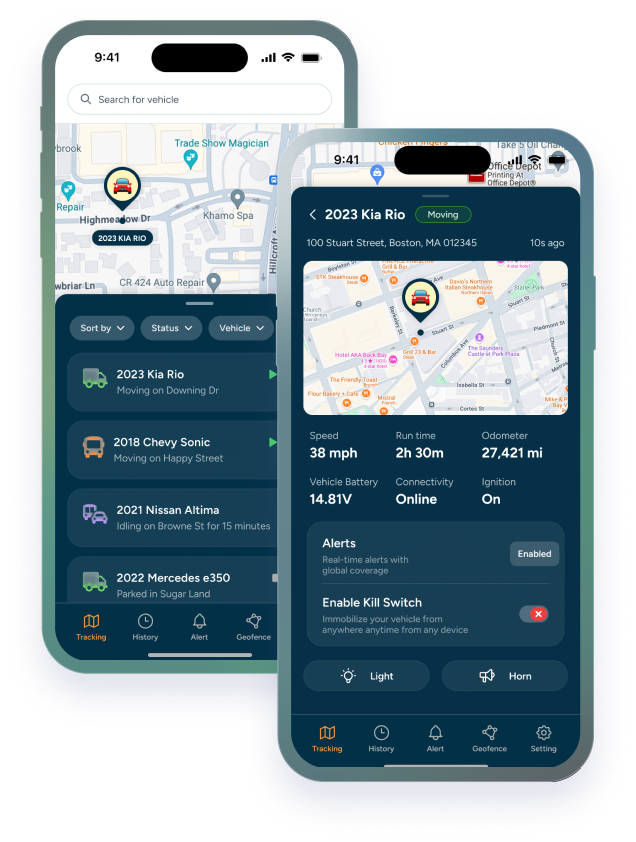

What if you could ask your fleet a question instead of digging through your fleet management dashboard to find the answer?
“Show me a driver behavior report for my entire fleet for the past week.”
“Which vehicles exceeded the speed limit today?”
“Which vehicles have been idle for more than two hours?”
“Give me a summary of all geofence alerts from yesterday.”
Instead of manually finding the right report, selecting dates, filtering vehicles, and sorting through the results, you can ask. That’s the idea behind TrackHawk Fleet’s new Model Context Protocol (MCP) integration. Trackhawk Fleet can now connect with AI tools such as ChatGPT, Claude, and Gemini through MCP, opening up a new way to interact with your fleet data using natural language.
So, what exactly is MCP?
MCP stands for Model Context Protocol. It is an open standard that allows AI applications to connect with external systems, data, and tools. Think of it as a bridge between your AI assistant and your fleet management software. Normally, an AI assistant only knows what you tell it. With an MCP connection, an AI application can interact with the tools and information that Trackhawk makes available to it.
That means you don't necessarily have to translate a question into a series of dashboard clicks. You can simply ask the question. And that's where things get interesting.
What can you ask Trackhawk through AI?
Imagine starting your workday with a simple prompt:
“Show me a driver behavior report for my entire fleet for today.”
Your AI assistant can use the Trackhawk connection to retrieve the relevant fleet information and present the results in a format that's easier to review. See the video below
You could then continue the conversation:
“Which drivers had the most speeding events?”
Then:
“Show me their total number of speeding events and the dates they occurred.”
And then:
“Give me the three drivers who need the most attention based on this data.”
You're no longer starting over with a new report every time. You're having a conversation with your fleet data. The exact questions you can ask depend on the TrackHawk capabilities available through MCP, but the concept is simple:
You ask for the information you need. Your AI assistant helps retrieve and organize it.
Why does this matter for fleet management?
Fleet management generates a lot of data. Vehicles. Drivers. Locations. Alerts. Geofences. Mileage. Activity. Utilization. Driver behavior. The challenge isn't always having the data. Sometimes, it's getting the right information at the right time.
Traditionally, answering a question might look something like this: Open the dashboard → find the right report → select your fleet → choose a date range → apply filters → review the results → repeat for the next question. AI changes the starting point. Instead of asking:
“Where do I find this report?” you can ask: “What happened with my fleet this week?”
And then keep digging. The interaction becomes more conversational. Instead of running several disconnected searches, you're building on the previous question.It's the difference between looking at a database and having a conversation with the data.
How to connect Trackhawk Fleet to your AI assistant
Getting started requires connecting your AI application (Claude, ChatGPT, etc) to Trackhawk's MCP server.
The setup will depend on the AI application you're using, but the process generally involves connecting the application to the Trackhawk MCP endpoint and authorizing access, just like you would connect any app, from the main dashboard.
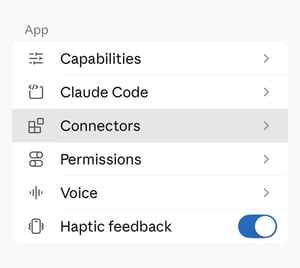
On claude it's very simple to do! All you have to do is go to the main dashboard, then press on connectors.
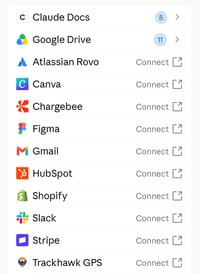
 from there you will see the list of apps you usually use, simply choose Trackhawk GPS and press on connect.
Allow it to connect and log in with your username and password for Trackhawk Fleet. Once connected, the AI assistant can access the Trackhawk capabilities made available through MCP.
MCP doesn't replace Trackhawk Fleet
MCP isn't about replacing Trackhawk Fleet with ChatGPT, Claude, Gemini, or another AI assistant. Trackhawk Fleet remains the source of your fleet data and fleet-management capabilities. MCP provides a standardized way for compatible AI applications to connect with those capabilities.
Think of the AI assistant as another interface for interacting with the information Trackhawk makes available. Your dashboard isn't going anywhere. You're simply gaining another way to access and work with your fleet data.