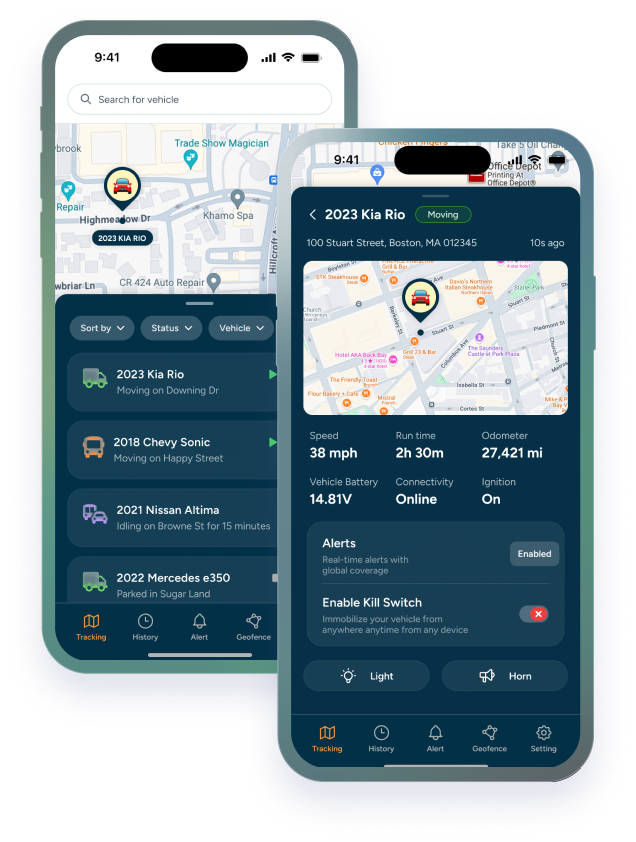

Contractors rarely manage a simple fleet. A normal day can involve work trucks, service vans, enclosed trailers, compact machines, generators, tools, and equipment moving between yards, jobsites, suppliers, and crews.
That mix creates a visibility problem. A truck may be easy to locate, but a trailer parked overnight, a machine moved to another site, or a tool trailer left behind can slow down the next job before anyone realizes there is an issue.
GPS tracking for contractors helps businesses monitor vehicles, trailers, tools, and equipment from a more organized system instead of relying on phone calls, memory, or jobsite check-ins. It can help teams see where valuable assets are, how they move, and which ones need attention.
This article is for contractors, field managers, owners, and operations teams that need better visibility across jobsite assets without treating every vehicle, trailer, and piece of equipment the same way.
TL;DR / Key Takeaways
- Contractors often need to monitor more than vehicles, including trailers, generators, compact equipment, and high-value tools.
- GPS tracking can help reduce jobsite guesswork by showing asset location, movement history, and alerts.
- Vehicles, trailers, and equipment may need different tracking setups based on power, placement, and usage.
- The best contractor tracking plan starts with the assets that create the most risk when they are missing, misplaced, or unavailable.
Contractor Tracking Is More Than Vehicle Location
A contractor may know where the crew truck is and still have no clear answer on where the trailer, compressor, skid steer, generator, or tool cabinet ended up. That is why contractor tracking has to be bigger than standard fleet visibility.
The asset that delays the job is not always the vehicle.
Trackhawk’s Equipment & Asset Tracking page is a useful starting point for businesses that need visibility across powered and non-powered assets. For contractors, the goal is not to track everything for the sake of tracking. It is to know which assets affect scheduling, revenue, security, and crew productivity when they are not where they should be.
What Contractors Should Track Across a Jobsite Operation
The practical question is not “Can this be tracked?” It is “Would losing visibility into this asset create a real problem?” For most contractors, the highest-priority assets are the ones that move often, sit outside, support multiple crews, or carry enough value to justify monitoring.
That usually includes work trucks, service vans, utility trailers, enclosed trailers, generators, compact machines, and specialized equipment. Some businesses may also monitor high-value tool storage or mobile assets that move between jobsites, but that does not mean every small tool needs its own GPS tracker.
For contractors managing vehicles and crews together, Trackhawk’s business GPS tracking plans can help connect vehicle visibility with broader asset oversight. When trailers are a major part of the operation, the Trailer GPS Tracker page is a more specific next step.
Why Trailers and Equipment Need Different Tracking Logic
It is easy to group all contractor assets together, but trailers and equipment do not behave like work trucks. A truck has power, a regular driver, and a more predictable daily route. A trailer may sit for days, move after hours, or be parked at a jobsite where nobody checks it until the next shift.
Equipment creates another layer. Some machines are powered and used daily, while others are portable, parked remotely, or used only during certain phases of a job. That affects power source, update frequency, placement, and alert setup.
A good tracking plan separates assets by how they are used. Vehicles need fleet visibility. Trailers need movement and location awareness. Equipment needs protection and availability signals. For a related field-asset example, Trackhawk’s article on GPS Tracking for Construction Equipment shows how high-value equipment visibility can support field operations and asset protection.
How GPS Tracking Helps Reduce Jobsite Guesswork
Think about the moment before a crew leaves for a job. Someone has to know which trailer is available, where the equipment is staged, whether the generator came back, and whether a vehicle is already assigned elsewhere.
Without tracking, that often turns into calls, texts, and assumptions. GPS tracking can help replace that scramble with location data, movement history, and alerts that show when an asset moves outside expected use.
This can support daily operations as much as security. The benefit is not only finding something after it is missing. It is reducing the uncertainty that makes crews wait, jobs start late, or managers spend time chasing down basic asset information.
Tracking Features Contractors Should Prioritize
Contractors do not need the most complicated system. They need the right signals for field operations.
Useful features often include:
- Real-time or scheduled location updates: Helps teams see where vehicles, trailers, and key assets are.
- Geofencing: Alerts managers when equipment leaves a yard, jobsite, or approved area.
- Movement alerts: Helps identify when trailers or equipment move unexpectedly.
- Route and location history: Gives managers a record of where an asset has been.
- Battery and device alerts: Helps teams avoid silent tracking gaps when devices need attention.
- User permissions: Keeps tracking access organized across managers, dispatchers, and operations staff.
For equipment-specific background, Trackhawk’s guide on GPS Devices for Equipment Tracking can help contractors think through device type, placement, and practical use cases without treating every asset the same way.
Building a Contractor Asset Tracking Plan
The best contractor tracking plan starts with risk. List the vehicles, trailers, machines, and portable assets that would cause the biggest disruption if they were missing, moved, or unavailable. Then group them by how they are powered, how often they move, and who needs visibility.
From there, decide which alerts matter. A trailer may need geofence and movement alerts. A truck may need route history and driver behavior insights. A generator or compact machine may need location updates and battery awareness.
Trackhawk can help contractors compare smart GPS solutions for vehicles, trailers, tools, and equipment based on how assets actually move through the business.
The goal is not to make jobsite management more complicated. It is to give the business an extra set of eyes on the assets that keep work moving.
Frequently Asked Questions
What is GPS tracking for contractors?
GPS tracking for contractors is the use of GPS devices and software to monitor business vehicles, trailers, equipment, and other valuable assets used across jobsites, yards, and field operations.
What contractor assets should be tracked first?
Contractors should usually start with high-value, frequently moved, or hard-to-replace assets such as work trucks, enclosed trailers, utility trailers, generators, compact machines, and specialized equipment.
Do contractors need different trackers for vehicles and trailers?
Often, yes. Vehicles, trailers, and equipment may need different device types based on power access, placement, update needs, and how the asset is used in daily operations.
Can GPS tracking help with jobsite theft prevention?
GPS tracking can help reduce theft risk by supporting location visibility, geofencing, movement alerts, and response workflows. It cannot guarantee prevention or recovery, but it can give teams better information when assets move unexpectedly.
How does GPS tracking reduce jobsite guesswork?
GPS tracking helps managers see where important assets are, review movement history, and respond to alerts instead of relying only on phone calls, memory, or manual checks.
What should contractors look for in a tracking setup?
Contractors should look for asset visibility, geofencing, movement alerts, route history, battery awareness, user permissions, support, and a setup that matches how vehicles, trailers, and equipment actually move between jobsites.