
Delivery operations move quickly. Routes change, drivers run behind, customers ask for updates, and managers need to know what is happening without calling or texting every few minutes.
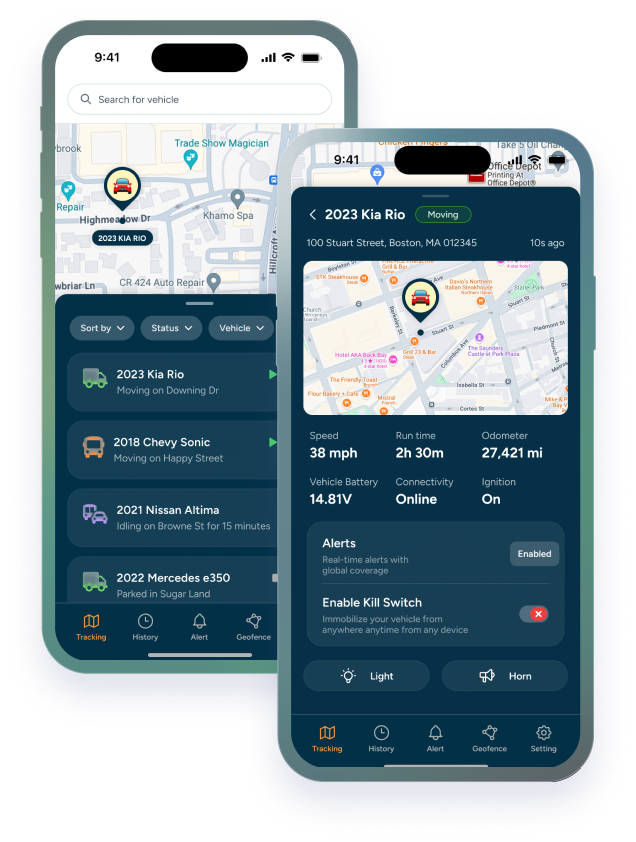
That is where delivery vehicle GPS tracking can help. Instead of relying on manual check-ins, businesses can use real-time location, route history, alerts, and fleet visibility to understand where vehicles are and what needs attention.
Delivery vehicle GPS tracking is the use of GPS devices and software to monitor delivery vehicles, route activity, stops, alerts, and vehicle movement from a central dashboard.
This article is for delivery businesses, fleet managers, dispatchers, service operators, and owners who want better visibility without adding more manual work to the day.
TL;DR / Key Takeaways
- Delivery vehicle GPS tracking helps businesses reduce repeated calls, texts, and manual status checks.
- The most useful visibility includes real-time location, route history, stops, alerts, and driver behavior signals.
- Alerts should focus on real exceptions, not every small movement.
- The right delivery tracking setup should support dispatch, customer communication, and fleet control without overwhelming drivers or managers.
Why Delivery Visibility Breaks Down as Routes Get Busier
Delivery visibility is easy when there are only a few stops and one person knows where every vehicle is. It gets harder when routes change, traffic delays stack up, drivers cover different territories, and customers expect answers.
The old workaround is manual communication. A dispatcher calls. A driver texts. A manager checks in again. That may work for a small team, but it creates friction as the delivery operation grows.
GPS tracking changes the workflow by giving managers a live view of vehicle movement. Trackhawk’s business GPS tracking plans help businesses move from scattered updates to a more organized system for route visibility, alerts, and fleet activity.
What Delivery Vehicle GPS Tracking Should Show You
The point of delivery tracking is not to watch a map all day. It is to answer the operational questions that come up during the route.
A useful setup should show:
- Real-time vehicle location: Know where delivery vehicles are without interrupting the driver.
- Route history: Review where a vehicle traveled and when it stopped.
- Stop activity: Understand whether a route is progressing or sitting too long in one place.
- Geofencing alerts: Receive notifications when vehicles enter or leave important areas.
- Driver behavior signals: Review speeding, harsh braking, harsh acceleration, excessive idle, and other activity that may affect safety or efficiency.
For delivery-specific workflows, Trackhawk’s Delivery GPS Tracking page connects these visibility needs to delivery fleet operations.
How GPS Tracking Reduces Manual Check-Ins
Manual check-ins cost attention. Every call, text, or status request pulls someone away from the work they were already doing. For drivers, that can be distracting. For managers, it turns routine visibility into repeated follow-up.
GPS tracking helps reduce that back-and-forth by making location and route activity visible in the dashboard. Dispatchers can check vehicle status, review route progress, and respond to customer questions without asking drivers for another update.
The result is a cleaner rhythm for the workday. Drivers stay focused on the route, managers get better visibility, and exceptions can stand out faster because the basic status questions are already answered.
Alerts That Matter for Delivery Fleets
Not every alert is useful. A delivery fleet does not need constant noise from every normal movement. It needs alerts that point to real exceptions.
For many delivery teams, that means after-hours movement, geofence entry or exit, long stops, towing alerts, speeding, harsh driving events, and excessive idle. These alerts can help managers spot issues without turning the tracking system into another stream of distractions.
The smart move is to build alerts around the questions the business already asks: Is the vehicle on route? Did it leave the service area? Is it stopped longer than expected? Is something happening after hours? When alerts answer those questions, tracking becomes practical instead of noisy.
Keeping Visibility Helpful for Drivers and Managers
Delivery GPS tracking works best when the team understands why it exists. The goal is not to create a surveillance culture. The goal is to support safer routes, clearer dispatch, better customer communication, and stronger control over business vehicles.
Managers should set expectations before rollout. Drivers should know what is tracked, why it matters, and how the information will be used. That is especially important when alerts involve driving behavior, after-hours movement, or route exceptions.
For broader fleet management guidance, Trackhawk’s guide on How to Effectively Manage Fleet of Vehicles can help connect GPS tracking to the bigger picture of operations, driver safety, and fleet performance.
How to Choose the Right Delivery Tracking Setup
What should a delivery business look for in a GPS tracking setup?
The real answer depends on route volume, vehicle count, dispatch needs, and how often managers need updates. A smaller delivery team may need real-time location and route history. A larger operation may need geofencing, alerts, driver behavior insights, maintenance reminders, and user permissions.
Trackhawk’s GPS tracking software features can help businesses compare practical tools like real-time tracking, alerts, geofencing, route history, driver behavior, and vehicle management. The right setup should reduce manual work, not create another system that the team has to fight with.
A Better Way to See Delivery Operations
Delivery visibility should not depend on constant check-ins. GPS tracking gives businesses a clearer way to see where vehicles are, how routes are moving, and which exceptions need attention.
Trackhawk GPS supports delivery and business fleets with smart GPS solutions, real-time visibility, alerts, hardware + software included, transparent pricing, and 24/7 live support.
When delivery vehicles are tied to customer expectations, schedules, and revenue, visibility is not extra. It is part of running the route with confidence.
Frequently Asked Questions
What is delivery vehicle GPS tracking?
Delivery vehicle GPS tracking uses GPS devices and software to help businesses monitor delivery vehicle location, route history, stops, alerts, and activity from a dashboard.
How can GPS tracking reduce manual delivery check-ins?
GPS tracking can reduce manual check-ins by giving managers and dispatchers access to vehicle location and route progress without repeatedly calling or texting drivers.
What alerts matter most for delivery vehicles?
Useful delivery fleet alerts may include geofence alerts, after-hours movement, long stops, towing alerts, speeding, harsh driving events, and excessive idle.
Does delivery GPS tracking help customer communication?
It can help by giving dispatchers better visibility into vehicle location and route progress, which may support clearer customer updates when timing changes.
What should delivery businesses look for in a GPS tracking system?
Delivery businesses should look for real-time tracking, route history, geofencing, practical alerts, driver behavior visibility, user permissions, support, and a setup that fits their route volume.